Showing posts with label Texas Renaissance Festival. Show all posts

Sunday, November 21, 2010

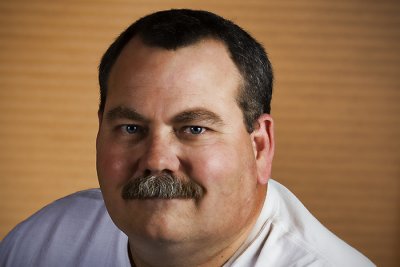
#638. Renaissance Man

I ran into this character at the Texas Renaissance Festival in Magnolia, Texas on Saturday while on a field trip with the Bay Area Photo Club.

Title: "Renaissance Man"


Shot Data: 1/125s f/5.6 at 275.0mm iso320
Camera / lens: Canon 40d / Canon 100-400mm L zoom
Post-processing: Adobe Camera Raw > Tapaz Adjust plugin > Red Paw Media Bleach Bypass

Monday, November 9, 2009

Happy Couple, Musical Monk and Pirate in Purple

These are my last three shots from the Bay Area Photo Club's field trip to the Texas Renaissance Festival in Plantersville, Texas three weekends ago.


Title: "Happy Couple"


Shot data: 1/80s f/5.0 at 50.0mm iso200

Title: "Musical Monk"


Shot data: 1/500s f/2.2 at 50.0mm iso200

Title: "Pirate in Purple"


Shot data: 1/125s f/3.5 at 50.0mm iso200

Saturday, November 7, 2009

Contemplative Character

Taken at the Texas Renaissance Festival two weekends ago. This young man's contemplative posture makes me imagine him as a Renaissance philosopher. Although he may in fact just be wondering where he left his cell phone. :-)

Title: "Contemplative Character"


Shot data: 1/160s f/2.8 at 50.0mm iso125
Camera / Lens: Canon 40D / Canon 50mm f/1.4 prime
Post-processing: Adobe Camera Raw > Photoshop CS3 > Topaz Adjust plugin

Friday, November 6, 2009

RenFest Pirate

Taken at the Texas Renaissance Festival two weekends ago.

Title: "RenFest Pirate"


Shot data: 1/60s f/3.5 at 50.0mm iso200
Camera / Lens: Canon 50mm f/1.4 prime
Post-processing: Adobe Camerea Raw > Photoshop CS3 > Topaz Adjust plugin

Wednesday, November 4, 2009

RenFest Horned Warrior

Captured at the Texas Renaissance Festival two Saturdays ago. It's kind of hard not to notice someone wearing horns! And this guy wasn't the only one either! :-)

Title: "RenFest Horned Warrior"


Shot data: 1/250s f/3.5 at 50.0mm iso125
Camrea / Lens: Canon 40D / Canon 50mm f/1.4 prime
Post-processing: Adobe Camera Raw > Photoshop CS3 > Topaz Adjust plugin

Tuesday, November 3, 2009

Another RenFest Warrior

Here's another character from our trip to the Texas Renaissance Festival on Saturday before last. My formula for this one was "Interesting Face" + "Interesting Costume" = "Interesting Photo" (hopefully)! :-)

Title: "Another RenFest Warrior"


Photo data: 1/50s f/3.5 at 50.0mm iso125
Camera / Lens: Canon 40D / Canon 50mm f/1.4 prime
Post-processing: Adobe Camera Raw > Photoshop CS3 > Topaz Adjust plugin

Sunday, November 1, 2009

Renaissance Couple

Here's a couple more photos from my trip to RenFest Saturday before last. I thought this couple did an extraordinary job of dressing in authentic Renaissance period dress.

Title: "RenFest Gentlemen"


Photo data: 1/125s f/4.0 at 50.0mm iso125
Camera / Lens: Canon 40D / Canon 50mm f/1.4 prime
Post-processing: Adobe Camera Raw > Photoshop CS3 > Topaz Adjust

Title: "RenFest Lady"


Photo data: 1/160s f/4.0 at 50.0mm iso125
Camera / Lens: Canon 40D / Canon 50mm f/1.4 prime
Post-processing: Adobe Camera Raw > Photoshop CS3 > Topaz Adjust

Friday, October 30, 2009

RenFest Red Head and Her Minion

Here's two characters from the Texas Renaissance Festival last Saturday. These two were working together. Not exactly sure who or what they were supposed to be but my interpretation was "evil step sister" and her "androgynous minion". Of all the oddball characters I saw this day these two may possibly have been the most fascinating.

Title: "RenFest Redhead"


Shot data: 1/125s f/3.5 at 50.0mm iso200
Camera / Lens: Canon 40D / Canon 17-55mm f/2.8 zoom


Title: "RenFest Minion"


Shot data: 1/125s f/3.5 at 50.0mm iso200
Camera / Lens: Canon 40D / Canon 17-55mm f/2.8 zoom

Wednesday, October 28, 2009

RenFest Maidens

Here's another photo from Saturday's trip to the Texas Renaissance Festival in Plantersville, Texas with the Bay Area Photo Club. Today I'm posting a photo of a couple of Beauties to go along with my posting on Monday of the Beast. :-)

Title: "RenFest Maidens"


Shot data: 1/400s f/3.5 at 50.0mm iso200
Camera / Lens: Canon 40D / Canon 17-55mm f/2.8 zoom
Canon 430 EX Flash on monopod with CTO gel triggered by Pocket Wizard

Monday, October 26, 2009

RenFest Warrior

On Saturday I went with a group of photographers from the Bay Area Photo Club to the 2009 Texas Renaissance Festival in Plantersville, Texas. The weather was great and it worked out that there were plenty of costumed characters more than willing to cooperate with folks who where inclined to take photos. This fellow was one of my favorites.

Title: "RenFest Warrior"


Shot Data: 1/60s f/3.5 at 50.0mm iso125
Camera / Lens: Canon 40D / Canon 17-55mm f/2.8 zoom
Flash: Canon 430EX (w/ CTO gel) on a monopod triggered by Pocket Wizard

Thursday, November 27, 2008

Festival Singers

I was going back through the photos from my most recent trip to the Texas Renaissance Festival and found this photo of a group of singers. In spite of a couple of technical flaws I like the way it turned out.

Title: "Festival Singers"


Camera / Lens: Canon 40D / Canon 17-55mm f/2.8 zoom
Post-processing: Photoshop CS3 > Duplicate Background > Topaz Adjust "Spicify" preset > High Pass Sharpening > Red Paw Media Beautifier > Merge Visable to New Layer > Distort Lens Correction Vignette

Saturday, November 22, 2008

Ever Watchful Dragon

This photo comes from the Texas Renaissance Festival grounds. I took the photo last weekend when some fellow Bay Area Photo Club members and I were there.

Title: "Ever Watchful Dragon"


Camera / Lens: Canon 40D / Canon 100-400mm zoom
Post-processing: Photomatix to convert three handheld exposures (-2,0,+2) to an High Dynamic Range image > Photoshop CS3 > Duplicate Background Layer > Topaz Adjust “Simplify” + "Noise Reduction" using Linear Burn blending mode with a layer mask using a diamond gradiant > Merge Visible to New Layer > Unsharp Mask > Duplicate Layer > Topaz Adjust Noise Reduction with Layer Mask to preserve detail of the dragon > Merge Visible to New Layer to do some minor clean-up work with the cloning tool

Thursday, November 20, 2008

The Monk

Another character from this past weekend's outing to the Texas Renaissance Festival.

Title: "The Monk"


Camera / Lens: Canon 40D / Canon 17-55mm f/2.8 zoom
Post-processing: Photoshop CS3 > High Pass Sharpening > Merge Visible to New Layer > Topaz Adjust “Spicify” > Merge Visible to New Layer > Virtual Photographer "Character" # 50% Opacity > Merge Visible to New Layer > I cloned some foliage from a portion of the photo I ultimately cropped away to cover a tree truck in the middle of the background (and the subject's head)

I couldn't decide if I liked the color or B&W version better so here is the B&W version for your consideration as well (same processing as the color version with the addition of a B&W Adjustment Layer in Photoshop CS3).

Title: "B&W Monk"

Wednesday, November 19, 2008

The Sheriff

Here is my photographic interpretation of the Sheriff of Nottingham taken this past weekend at the Texas Renaissance Festival!

Title: "The Sheriff"


Camera / Lens: Canon 40D / Canon 17-55mm f/2.8 zoom
Post-processing: Photoshop CS3 > Duplicate Background > > Topaz Adjust Plugin “Simplify” @ 89% opacity > Curves Adjustment layer for improved contrast > Merge Visible to New Layer > Red Paw Media Bleach Bypass plugin @ 34% opacity > Merge Visible to New Layer > Cloning to remove high contrast distractions in the background and a button on subject jacket

Tuesday, November 18, 2008

Amazing Maze

This maze is located at the Texas Renaissance Festival. I photographed this maze this past Sunday from a platform located in the middle of it. It took me about 15 minutes of walking to find the platform so I have to say it is a pretty good maze in addition to being colorful! LOL

Title: "Amazing Maze"


Camera / Lens: Canon 40D / Canon 17-55mm f/2.8 zoom
Post-processing: Photoshop CS3 > Topaz Adjust “Vibrance” > Curves Adjustment layer to improve contrast > Merge Visible to New Layer > Crop and Free Transform Skew to imphasize the maze and de-emphasize the background > Merge Visible to New Layer > Brightness and Contrast Adjustment Layer to brighten up the image > Merge Visible to New Layer > Distort Lens Correction Vignette

Monday, November 17, 2008

Water Garden Fountain

Sunday I went to the Texas Renaissance Festival for the second time this season. This time I went with a group of photographers from the Bay Area Photo Club. Very early in the day I took this shot in the Water Garden Wedding Chapel.

Title: "Magic Fountain"

If the image is too tall for your screen resolution you should be able to click it and get a size that just fits your screen!

Camera / Lens: Canon 40D / Canon 17-55mm f/2.8 zoom
Post-processing: Photomatix to convert three handheld exposures (-2,0,+2) to a High Dynamic Range image > Photoshop CS3 > Duplicated background layer and performed a slight crop and rotation > NIK Viveza plugin for increasing local brightness in a couple of areas on the fountain > Merge Visible to New Layer > Topaz Adjust “Vibrance” with a layer mask to mask off the sky [the mask is invaluable in minimizing halos] > Curves Adjustment layer to improve contrast > added a second Curves Adjustment Layer to improve contrast with layer mask to mask off the sky [the sky was already at a point I liked]

Saturday, October 25, 2008

Texas Renaissance Festival

Here are the last couple of photos I'm going to post from my trip to the Texas Renaissance Festival in Magnolia, Texas last Saturday. At the Tomato Torrent attraction you toss ripe tomatoes at this guy while he tosses crude insults at you!

Title: "Tomato Torrent"


Camera / Lens: Canon 40D / Canon 100-400mm L zoom
Post-processing: Photoshop CS3 > High Pass Sharpening > Merge Visable to New Layer > Topaz Adjust > Curves Adjustment Layer for added contrast > Levels Adjustment layer to set the black point

I'm not really sure how this guy fits into the Renaissance theme but he was the most unusual character I saw all day!

Title: "Green Mask Dude"


Camera / Lens: Canon 40D / Canon 100-400mm L zoom
Post-processing: Photoshop CS3 > High Pass Sharpening > Merge Visable to New Layer > Topaz Adjust Photo Pop

Friday, October 24, 2008

Ren Fest Ladies

Title: "Fair Maiden"

Click the image for a larger view!
Camera / Lens: Canon 40D / Canon 100-400mm L zoom
Post-processing: Photoshop CS3 > High Pass Sharpening > Merge Visable to New Layer > Topaz Adjust Photo Pop @ 37% Opacity > Merge Visable to New Layer to do some minor cloning work

Title: "Lady"

Click the image for a larger view!
Camera / Lens: Canon 40D / Canon 100-400mm L zoom
Post-processing: Photoshop CS3 > High Pass Sharpening > Merge Visable to New Layer > Topaz Adjust Photo Pop > Merge Visable to New Layer > Nik Viveza plug-in to brighten the shadow area under the lady's hat just a little

Thursday, October 23, 2008

Ren Fest Characters

Here's two more pics form my trip to the Texas Renaissance Festival in Magnolia this past Saturday!

Title: "Skull Beard"

Click the image for a larger version!

Camera / Lens: Canon 40D / Canon 100-400mm L zoom
Post-processing: Photoshop CS3 > High Pass Sharpen > Merge Visible to New Layer > Topaz Adjust Simplify > Merge Visible to New Layer > Clone out patch on shirt > Merge Visible to New Layer > Virtual Photographer "Anvil" at 26% opacity > Merge Visible to New Layer > Paint with Black Paint Brush over upper right hand corner to eliminate a high contrast white background

Title: "Ahoy"

Click the image for a larger version!

Camera / Lens: Canon 40D / Canon 100-400mm L zoom
Post-processing: Photoshop CS3 > High Pass Sharpening > Merge Visible to New Layer > Topaz Adjust Simplify > Curves Adjustment Layer for added contrast > Hue / Saturation Layer to increase Saturation (careful - only a little) > Merge Visible to New Layer > Distort Lens Correction Vignette


Wednesday, October 22, 2008

Ren Fest Characters

Here are a couple more photos I took at the Texas Renaissance Festival in Magnolia, Texas last Saturday. I like the quality of light in both photos.

Title: "Big Hat Guy"

Click the image for a larger version!

Camera / Lens: Canon 40D / Canon 100-400mm L zoom
Post-processing: Photoshop CS3 > High Pass Sharpening > Merge Visible to new Layer > Topaz Adj Plugin "Spicify" > Curves Adjustment Layer to increase contrast > Merge Visible to New Layer > Distort Lens Correction > Vignette

Title: "Knight"

Click the image for a larger version!

Camera / Lens: Canon 40D / Canon 100-400mm L zoom
Post-processing: Photoshop CS3 > High Pass Sharpening > Merge Visible to new Layer > Red Paw Media Bleach Bypass plugin