Showing posts with label Street Portrait. Show all posts

Thursday, February 14, 2013

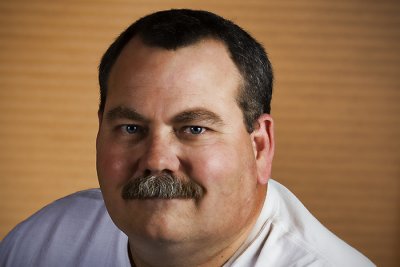
#887. Valentine

Taken a couple of weekends ago in Richmond,Texas. Happy Valentine's Day!!

Title: "Valentine"
Camera / Lens: Canon 5D Mark II / Canon 100-400mm L zoom
Shot data: 1/1250s f/5.6 at 400.0mm iso2500
Post-processing: Adobe Camera Raw > Photoshop CS4 > Nik Color Efex Pro

Sunday, November 21, 2010

#638. Renaissance Man

I ran into this character at the Texas Renaissance Festival in Magnolia, Texas on Saturday while on a field trip with the Bay Area Photo Club.

Title: "Renaissance Man"


Shot Data: 1/125s f/5.6 at 275.0mm iso320
Camera / lens: Canon 40d / Canon 100-400mm L zoom
Post-processing: Adobe Camera Raw > Tapaz Adjust plugin > Red Paw Media Bleach Bypass

Saturday, November 28, 2009

Three Generations

Taken on Thanksgiving Day at a family get together in Teague, Texas. Is this a great photo or is it just me? Do you have to know and care for the folks in the photo to love it as much as I do or does it move you anyway?

Title: "Three Generations"


Shot data: 1/60s f/5.0 at 44.0mm iso250
Camera / Lens: Canon 17-55mm f/2.8 zoom
Post-processing: Adobe Camera Raw > Photoshop CS3 > Topaz Adjust plugin

Monday, November 9, 2009

Happy Couple, Musical Monk and Pirate in Purple

These are my last three shots from the Bay Area Photo Club's field trip to the Texas Renaissance Festival in Plantersville, Texas three weekends ago.


Title: "Happy Couple"


Shot data: 1/80s f/5.0 at 50.0mm iso200

Title: "Musical Monk"


Shot data: 1/500s f/2.2 at 50.0mm iso200

Title: "Pirate in Purple"


Shot data: 1/125s f/3.5 at 50.0mm iso200

Saturday, November 7, 2009

Contemplative Character

Taken at the Texas Renaissance Festival two weekends ago. This young man's contemplative posture makes me imagine him as a Renaissance philosopher. Although he may in fact just be wondering where he left his cell phone. :-)

Title: "Contemplative Character"


Shot data: 1/160s f/2.8 at 50.0mm iso125
Camera / Lens: Canon 40D / Canon 50mm f/1.4 prime
Post-processing: Adobe Camera Raw > Photoshop CS3 > Topaz Adjust plugin

Friday, November 6, 2009

RenFest Pirate

Taken at the Texas Renaissance Festival two weekends ago.

Title: "RenFest Pirate"


Shot data: 1/60s f/3.5 at 50.0mm iso200
Camera / Lens: Canon 50mm f/1.4 prime
Post-processing: Adobe Camerea Raw > Photoshop CS3 > Topaz Adjust plugin

Wednesday, November 4, 2009

RenFest Horned Warrior

Captured at the Texas Renaissance Festival two Saturdays ago. It's kind of hard not to notice someone wearing horns! And this guy wasn't the only one either! :-)

Title: "RenFest Horned Warrior"


Shot data: 1/250s f/3.5 at 50.0mm iso125
Camrea / Lens: Canon 40D / Canon 50mm f/1.4 prime
Post-processing: Adobe Camera Raw > Photoshop CS3 > Topaz Adjust plugin

Tuesday, November 3, 2009

Another RenFest Warrior

Here's another character from our trip to the Texas Renaissance Festival on Saturday before last. My formula for this one was "Interesting Face" + "Interesting Costume" = "Interesting Photo" (hopefully)! :-)

Title: "Another RenFest Warrior"


Photo data: 1/50s f/3.5 at 50.0mm iso125
Camera / Lens: Canon 40D / Canon 50mm f/1.4 prime
Post-processing: Adobe Camera Raw > Photoshop CS3 > Topaz Adjust plugin

Sunday, November 1, 2009

Renaissance Couple

Here's a couple more photos from my trip to RenFest Saturday before last. I thought this couple did an extraordinary job of dressing in authentic Renaissance period dress.

Title: "RenFest Gentlemen"


Photo data: 1/125s f/4.0 at 50.0mm iso125
Camera / Lens: Canon 40D / Canon 50mm f/1.4 prime
Post-processing: Adobe Camera Raw > Photoshop CS3 > Topaz Adjust

Title: "RenFest Lady"


Photo data: 1/160s f/4.0 at 50.0mm iso125
Camera / Lens: Canon 40D / Canon 50mm f/1.4 prime
Post-processing: Adobe Camera Raw > Photoshop CS3 > Topaz Adjust

Friday, October 30, 2009

RenFest Red Head and Her Minion

Here's two characters from the Texas Renaissance Festival last Saturday. These two were working together. Not exactly sure who or what they were supposed to be but my interpretation was "evil step sister" and her "androgynous minion". Of all the oddball characters I saw this day these two may possibly have been the most fascinating.

Title: "RenFest Redhead"


Shot data: 1/125s f/3.5 at 50.0mm iso200
Camera / Lens: Canon 40D / Canon 17-55mm f/2.8 zoom


Title: "RenFest Minion"


Shot data: 1/125s f/3.5 at 50.0mm iso200
Camera / Lens: Canon 40D / Canon 17-55mm f/2.8 zoom

Wednesday, October 28, 2009

RenFest Maidens

Here's another photo from Saturday's trip to the Texas Renaissance Festival in Plantersville, Texas with the Bay Area Photo Club. Today I'm posting a photo of a couple of Beauties to go along with my posting on Monday of the Beast. :-)

Title: "RenFest Maidens"


Shot data: 1/400s f/3.5 at 50.0mm iso200
Camera / Lens: Canon 40D / Canon 17-55mm f/2.8 zoom
Canon 430 EX Flash on monopod with CTO gel triggered by Pocket Wizard

Monday, October 26, 2009

RenFest Warrior

On Saturday I went with a group of photographers from the Bay Area Photo Club to the 2009 Texas Renaissance Festival in Plantersville, Texas. The weather was great and it worked out that there were plenty of costumed characters more than willing to cooperate with folks who where inclined to take photos. This fellow was one of my favorites.

Title: "RenFest Warrior"


Shot Data: 1/60s f/3.5 at 50.0mm iso125
Camera / Lens: Canon 40D / Canon 17-55mm f/2.8 zoom
Flash: Canon 430EX (w/ CTO gel) on a monopod triggered by Pocket Wizard

Tuesday, October 20, 2009

Portrait of Emma

Friday night I was testing out a new Justin Clamp with my Canon 430EX flash. I grabbed a few shots of my daughter Emma while we were outside waiting for a play to start. I pretty much rely on trial and error when I'm working with a flash so after a series of over and under exposed shots I finally took a few with what looked to me like the correct exposure. As usual I would really appreciate any feedback about how today's shot turned out.

Title: "Portrait of Emma"


Shot data: 1/320s f/10.0 at 55.0mm iso100
Camera / Lens: Canon 40D / Canon 17-55mm f/2.8 zoom
Flash: Canon 430EX (TTL mode) Justin-clamped at camera right low pointed over the subjects head to feather the light
Post-processing: Adobe Camera Raw > Photoshop CS3 > Topaz Adjust plugin

Wednesday, September 23, 2009

Official Effort

This is one of the officials that helped organize the Galveston Bay Foundation's Marsh Mania event this past Saturday at Burnet Bay near Baytown. The Marsh Mania event was all about planting these buckets of grass so I wanted to emphasize the grass in this shot.

Title: "Official Effort"


Shot data: 1/250s f/13.0 at 17.0mm iso100
Camera / Lens: Canon 40D / Canon 17-55mm f/2.8 zoom
Post-processing: Adobe Camera Raw > Photoshop CS3 > Topaz Adjust plugin

Wednesday, September 2, 2009

Emma's Elevator Portrait

While in San Antonio last weekend I grabbed this impromptu portrait of my daughter Emma in the Hyatt's elevator. I used my Canon D40's built-in flash and expected the image to be extremely over-exposed (after all I was a maximum of three feet away from my subject). I was pleasantly surprised when I had time to look at the image on my PC. Not only was the image not over-exposed, it was near perfect (at least to my eye). Anyway...my lesson learned was to not be afraid of using my camera's built-in flash when the situation dictates the need for flash and I don't have my accessory flash handy. It's better to risk a bad exposure (which turns out to maybe not to be that great of risk) than to pass up the shot entirely!

Title: "Emma's Elevator Portrait"


Shot data: 1/60s f/4.0 at 23.0mm iso1250
Camera / Lens: Canon 40D / Canon 17.55mm f/2.8 zoom with built-in flash
Post-processing: Photoshop CS3 > Topaz Adjust plugin

Wednesday, May 13, 2009

Do U C What I C?

This was my Assignment entry for Honors Night at the Bay Area Photo Club last night. The assignment was "Motion Blur." I took the photo over the weekend at the Kemah Boardwalk. I used a tripod and took the photo with a long (5 second) exposure. Well actually I took 30 or 40 photo's and this is the one I liked best. :-) I really like the photo and it received good comments from the judges but was scored poorly earning a "No Award". As it turns out there were no Gold Awards given for any photo entered in the Assignment category (Motion Blur) last night. Well...anyway how would you have scored it? A "No Award" like our panel of judges, a "Gold Award", "Silver", "Bronze Award"? I know you don't know the actual judging criteria but this is just for fun anyway! :-)

Cheers!

Title: "Kemah Boardwalk Fountain"


Camera / Lens: Canon 40D / 17-55mm f/2.8 zoom
Shot data: 5s f/9.0 at 55.0mm iso250

Tuesday, February 24, 2009

Houston Zoo #1

The Bay Area Photo Club made a field trip to the Houston Zoo this past Saturday. I took a few acceptable animal photos but I think my favorite shot of the day may be this shot of a little girl in front of one of the zoo's water fountains.

Title: "Zoo Fountain Girl"


Camera / Lens: Canon 40D / Canon 100-400 L zoom
Post-processing: Photoshop CS3 > Duplicate Background Layer > Topaz Adjust plugin "Spicify" preset + custom Detail and Noise Reduction adjsutments in Luminosity blending mode > Merge Visible to New Layer > Distort Lens Correction Vignette

Wednesday, February 11, 2009

Roger Williams

We had a visit at work today from former Texas Secretary of State Roger Williams. Mr. Williams has announced that he has joined the race to replace US Senator Kay Bailey Hutchison when she vacates her Senate seat to run for Texas Governor. Mr. Williams spoke for a few minutes, took a few questions, and then headed off to his next stop on the campaign trail. I liked Mr. Williams and I agreed with a lot of his political views: The only problem is that I suspect, as with all politicians, that he was lying...because his lips were moving! :-)

Title: "Roger Williams"


Camera / Lens: Canon 40D / Canon 17-55mm f/2.8 zoom
Post-processing: Photoshop CS3 > Duplicate Background Layer > High Pass Sharpening > Curves Adjustment Layer to improve overall contrast > Merge Visible to New Layer > Topaz Adjust plugin "Simplify" preset > Duplicate Layer > Distort Lens Correction Vignette

Tuesday, January 13, 2009

Family Pics

Here are a couple of photos I took of family members while we were out running around weekend before last. The photo of my daughter Emma was taken in a gazebo at a park on Toddville Road in Seabrook and the photo of Emma and my wife Laura was taken at Armand Bayou Nature Center on the Prairie Trail. These are just "grab shots" and I know they aren't great portraits but I wanted to include them to demonstrate how HDR (first photo) can be used for portraits in harsh lighting conditions and to show off the beauty of the Prairie Trail (and my family :-) at Armand Bayou Nature Center (second photo)!

Title: "Emma - Seabrook Gazebo"


Camera / Lens: Canon 40D / Canon 17-55mm f/2.8 zoom
Post-processing: Photomatix HDR from three handheld (camera propped up on the ledge of the Gazebo and set to use the two second timer) exposures (-2, 0, +2) > Photoshop CS3 > Curves Adjustment Layer for overall contast enhancement > Levels Adjustment Layer to set a black point > Merge Visible to New Layer > Nik Viveza plugin to brighten the face which was still a little dark even after HDR processing due to the extreme contrast caused by the severe backlighting > Topaz Adjust plugin "Simplify" preset with mask to block the effect from the eyes, nose, mouth, and hair

Title: "Emma and Laura - ABNC"


Camera / Lens: Canon 40D / Canon 100-400mm L zoom
Post-processing: Photoshop CS3 > Duplicate Layer > Free Transform to level the horizon > Nik Viveza to brighten the subjects > Curves Adjustment Layer for overall contast enhancement > Merge Visible to New Layer > Topaz Adjust plugin "Simplify" preset > Duplicate Layer > High Pass Sharpening in Hard Light blending mode > Merge Visible to New Layer in Screen mode at 49% opacity to make the whole image brighter


Sunday, November 16, 2008

Tattoo Contest

The motorcycle rally I attended in Liberty, Texas yesterday featured a tattoo contest (I know, I know, it's hard to imagine a biker with tattoos :-)!

Title: "Tattooed Redhead"


Camera / Lens / Other Equipment: Canon 40D / Canon 17-55mm f/2.8 zoom / Vivitar 285HV flash w/ Lumiquest Mini Softbos mounted off-camera on a monopod and fired with Pocket Wizards

Post-processing: Photoshop CS3 > High Pass Sharpening > Merge Visible to New Layer > Red Paw Media Beautifier plugin @ 72% opacity > Merge Visible to New Layer > Curves Adjustment Layer for improved contrast > Create New Layer Fill Black with Mask to simplify the background and create a custom vignette